
Post Name

Nowadays car interiors rely heavily on touchscreens. Whether you drive a BMW 3 Series, VW Golf, Audi A4, Mercedes A-Class, Peugeot 3008, or Skoda Octavia, your infotainment display is the centre of navigation, settings, entertainment and safety features.

But these screens are also fragile—prone to scratches, fingerprints, micro-abrasions, and glare. A hydrogel navigation screen protector is one of the best ways to protect your car touchscreen without affecting clarity or touch sensitivity.

This guide shows you exactly how to install a hydrogel protector, step by step, with expert tips, mistakes to avoid, and a few insider tricks that most guides miss.

What Is a Hydrogel Screen Protector?


Hydrogel is a soft, self-healing, flexible material used widely in phone protection and now increasingly in automotive displays. Unlike tempered glass, it adapts to curved edges and eliminates small bubbles over time.

For more technical background, you can read the scientific definition on hydrogels

Hydrogel is ideal for infotainment screen protection because it:

Reduces glare

Absorbs micro-scratches

Maintains full touch sensitivity

Adapts to curved and angled car screens

Self-heals small marks over 24–48 hours

It’s especially useful for European cars where screens are large and glossy, such as:

Mercedes MBUX screens (A-Class, C-Class, GLC)

Volkswagen MIB systems (Golf, Passat, Tiguan)

BMW iDrive displays (3 Series, X1, X3)

Audi MMI touchscreens (A4, A3, Q5)

Peugeot i-Cockpit models

Renault Clio, Captur, Megane

Skoda Octavia, Superb, Scala


Curious which specific models benefit the most from hydrogel protection?

Check out our full guide on which cars benefit most from hydrogel navigation protection.

Before You Start: Essential Preparation


Installing a hydrogel protector takes only a few minutes, but the preparation stage determines whether the final result looks factory-perfect.

You Will Need


Hydrogel screen protector

Microfiber cloth

Screen-cleaning wipe (wet & dry)

Dust-removal sticker (optional but recommended)

Small squeegee / card 

Choose the Right Environment


Install the protector in:

A dust-free space (car parked indoors is ideal)

Soft lighting (so dust particles are visible)

A still environment (no wind, no blowing air)

Avoid doing it outside or while standing near open windows.
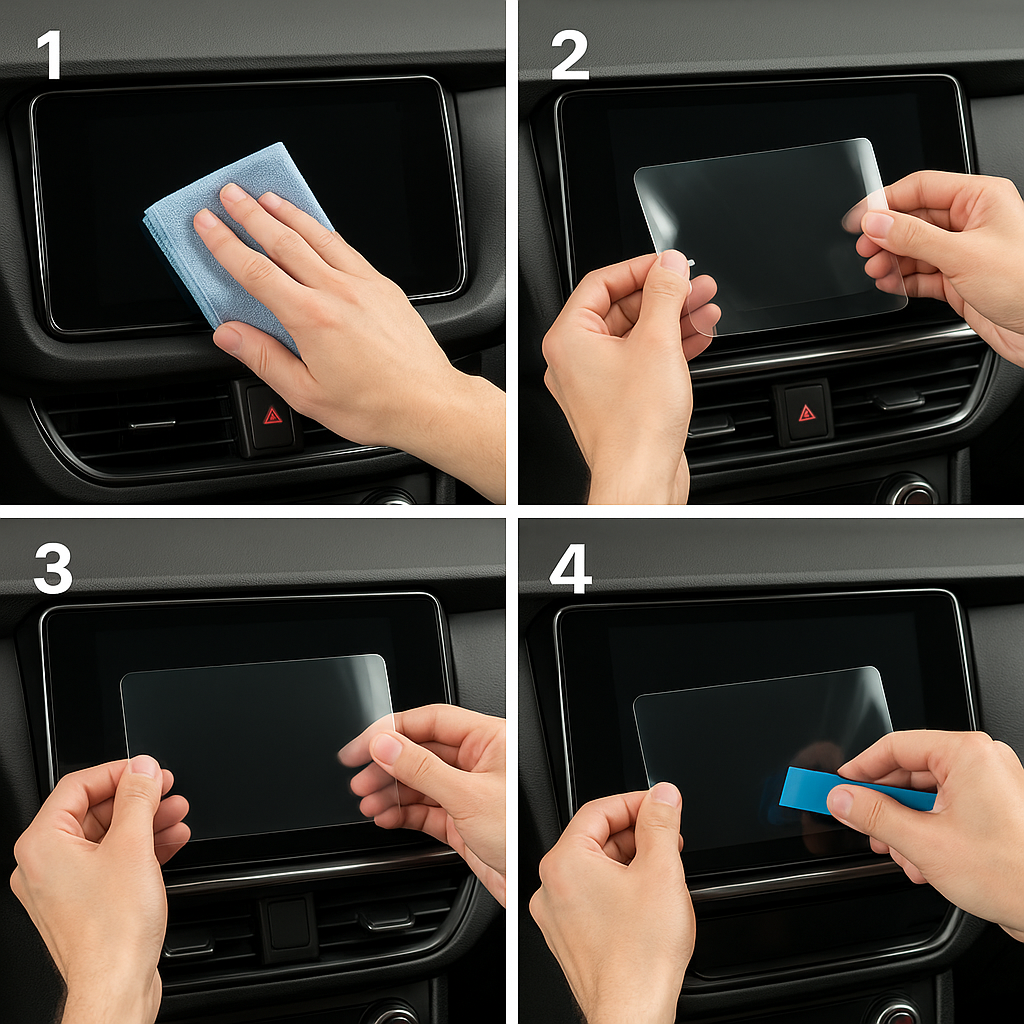
Step-by-Step: How to Install a Hydrogel Navigation Screen Protector


1. Clean the Navigation Screen Thoroughly


Use a wet wipe first, then a dry microfiber cloth.

Focus on:

Corners

Edges

Around the frame

Any oily fingerprints

Tip: Turn the screen off to see dust more easily.

2. Remove All Dust Particles


Even one small dust speck can create a permanent bubble.

Use:

Dust-removal stickers

A clean microfiber cloth

Hold the screen at an angle and look under the light. If perfectionism matters anywhere, it’s here.

3. Peel the First Protective Layer


Most hydrogel protectors have two layers.

Peel Layer 1 halfway and align the protector with:

Left and right edges

Upper frame

Any curved edges

Do not peel it completely yet.

4. Align and Apply the Protector


Once aligned:

Press the top centre gently

Slowly drag your finger downward

Peel off the rest of Layer 1 as you go

The film will naturally stick without much force.

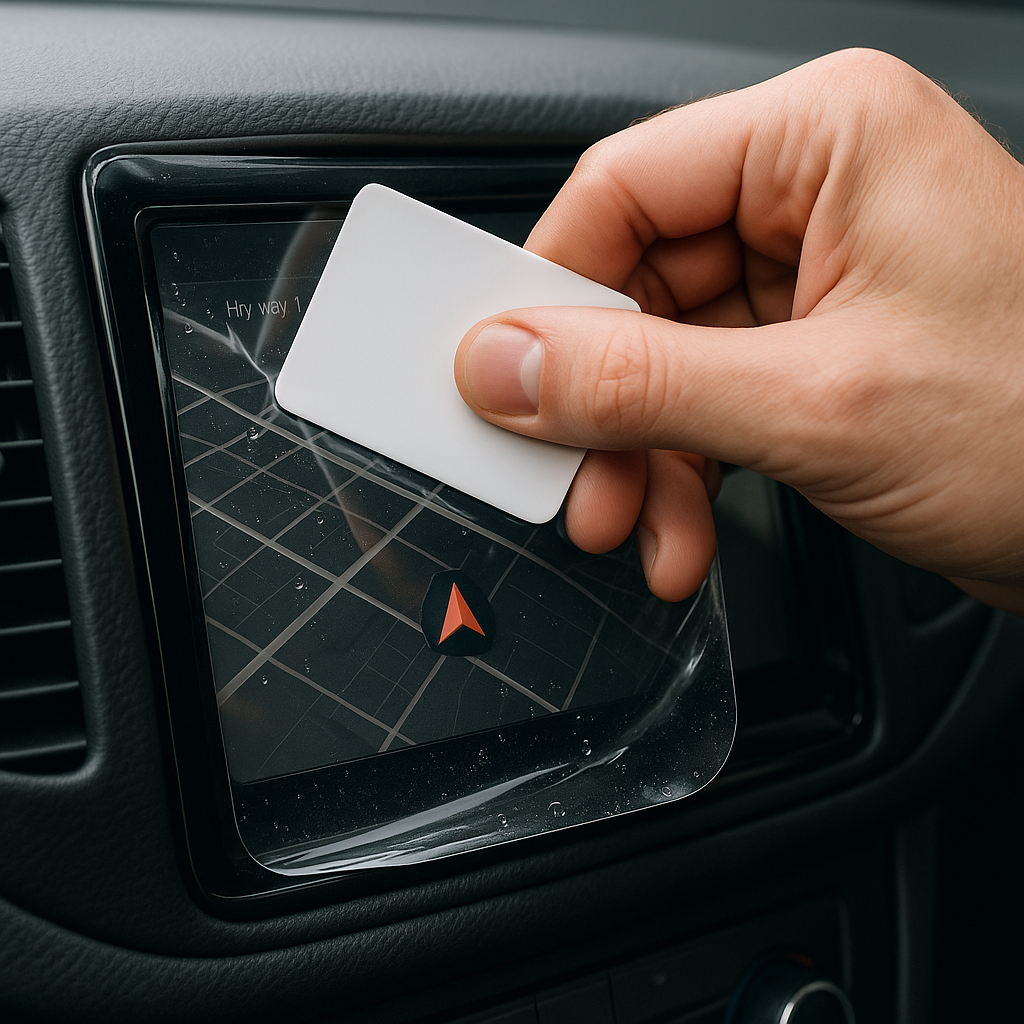
5. Use the Squeegee to Push Out Air


Work from centre outward, using firm but controlled pressure.

Hydrogel is self-healing, so small micro-bubbles usually disappear within 24–48 hours.

6. Remove the Final Top Layer


After application:

Peel Layer 2 from one corner

Pull slowly to avoid lifting the protector

This reveals a glossy, clear surface below.

7. Allow 24 Hours for Full Adhesion


Do not touch the screen too much during this period.

Avoid:

Heat exposure

Cleaning sprays

Aggressive pressing

Hydrogel needs time to “settle” and self-heal.
Common Mistakes to Avoid

Even a perfect protector can be ruined by simple errors.

 Installing in a dusty environment

Fibres, dust and hair easily get trapped.

Touching the sticky side

This leaves permanent marks.

Rushing the alignment

Hydrogel is flexible but not stretch-proof.

Cleaning with alcohol after installation

This can damage the outer coating.

Installing on a hot screen

Heat weakens adhesion and causes micro-bubbles.


For a complete walkthrough, see our guide on how to protect your car’s navigation screen.

Why Hydrogel Is Better Than Tempered Glass for Car Screens


Tempered glass works well for smartphones—but not for car navigation screens.

Hydrogel performs better because:

It bends and adapts to curved displays

It doesn’t create raised edges

It avoids touchscreen sensitivity issues

It self-heals micro-abrasions

It provides better Anti-Glare performance


If you want to see more in depth guide on why hydrogel protectors are better check out our guide on Hydrogel vs Tempered Glass Navigation Protectors Comparison


FAQs


1. Does a hydrogel protector reduce screen sensitivity

No. Hydrogel maintains full touch responsiveness because the material is soft and pressure-adaptive.

2. Can I reuse a hydrogel screen protector?

No. Once removed, it cannot be reinstalled cleanly.

3. How long do micro-bubbles take to disappear?

Usually 24–48 hours.

Stubborn ones may take up to 72 hours if the screen is curved.

4. Will the protector affect brightness or clarity?

High-quality hydrogel preserves original screen clarity.

Matte versions reduce glare but may slightly soften reflections.

5. Is hydrogel safe for anti-reflective or coated screens?

Yes. Hydrogel adhesive is gentle and does not damage coatings.


If you want premium hydrogel protectors for BMW, Audi, Mercedes, VW, Peugeot, Renault, Skoda and more, explore our full selection today.

Visit our shop at mr-key.com


Related Guides

Which cars benefit most from hydrogel navigation protection

How to Protect Your Car’s Navigation Screen from Scratches,Glare & Fingerprints

Hydrogel vs Tempered Glass Navigation Protectors Comparison

Related Posts

How to Identify Your Key Type for Easy Replacement

How to Identify Your Key Type for Easy Replacement

Replacing a lost or broken key might seem straightforward, but identifying the correct type of key is crucial to getting an exact replacement. Whether you need a car key, a house key, or even a cabinet key, each type has specific features that determine its function and fit. Here’s a step-by-step guide to understanding your key type, so you can save time and avoid unnecessary frustration when ordering a replacement. Why Key Identification is Important Keys come in many shapes and sizes, each designed for specific types of locks. Understanding your key’s unique characteristics ensures you get the right replacement and avoid wasted time or money on mismatched keys. Avoid Extra Costs : Ordering the wrong key can mean additional fees for reordering. Save Time : Getting the right key from the start saves the hassle of sending it back and waiting for the correct replacement. Enhance Security : Accurate key identification ensures your security by avoiding compromised, incorrect key fits. Types of Keys: Which One is Yours? Understanding the different types of keys can help you determine what you have. Here are the common types and what makes each unique. 1. Household Keys Household keys are typically designed for residential locks like front doors, back doors, and garage doors. These keys are often small and have either a single or double-sided cut pattern along the edges. Some household keys are unique in design, making them specific to a particular lock type. Common Features : Smaller, single or double-sided cuts. Typical Use : Standard residential door locks, such as deadbolts and knob locks. Tip : Look for any identifying numbers or letters on the key itself. These may indicate a specific lock series, making it easier to identify. 2. Car Keys Car keys come in various styles, depending on the make, model, and year of the vehicle. While older cars may use basic metal keys, most modern vehicles use transponder keys or fob keys with embedded chips for added security. Basic Car Keys : Metal keys without electronic components. Transponder Keys : These have a small chip embedded in the head, which communicates with the car to prevent theft. Key Fobs : Some cars use a fob that contains a keyless entry system, which requires programming specific to your vehicle. Tip : If your car uses a transponder or fob key, you may need assistance programming the replacement. 3. Padlock Keys Keys for padlocks can be small and compact, with a straightforward design. These keys often have a unique series number printed on them, making it easier to match them to a specific lock model. Common Features : Small size, usually single-sided. Typical Use : Storage units, gym lockers, and outdoor gates. 4. Furniture and Cabinet Keys Furniture and cabinet keys are typically found on desks, filing cabinets, and other types of lockable furniture. These keys are generally small, with a straight or tubular shaft, and they often have numbers or letters for identification. Common Features : Compact, single or double-sided cuts, often with identification codes. Typical Use : Office furniture, personal storage, and older-style drawers. 5. High-Security Keys High-security keys are specifically designed to prevent unauthorized duplication. These keys have unique, intricate cut patterns and require special authorization for copying. Common Features : Complex, often multi-sided cuts with additional security features. Typical Use : High-security doors in residential or commercial settings, safes, and secure access points. Key Identification Tips: What to Look For Once you know the type of key, you’ll want to examine specific details that will help with identification. Here’s what to look for: Keyway and Shape : The groove pattern, or “keyway,” is specific to the key type. Take note of the key’s shape and groove configuration. Markings and Codes : Look for any numbers or letters printed on the key. These often refer to specific lock brands or key series. Size and Length : Measure your key’s length, as some keys are longer or shorter depending on the lock type. Metal Head Design : Certain keys, like car keys, may have plastic or rubberized heads, which can indicate the need for a transponder or chip inside. Steps to Identify Your Key Type Inspect for Markings : Look closely at your key for any stamped numbers, letters, or symbols. These markings can often be referenced to find a matching lock or brand series. Measure Your Key : Use a ruler or tape measure to record the length and width of your key. These dimensions can help narrow down the exact key type. Examine the Cut Pattern : Take note of the number of cuts and whether they are on one or both sides. Identify the Head Style : If it’s a car key with a transponder, the head might be plastic or rubber. Check for a Code on the Lock : Some padlocks and cabinet locks have codes printed on them that correspond to a specific key model. What to Do When You Can't Identify the Key If your key has no visible markings or the cuts are unusual, consider taking a photo to help in the identification process. For specialty keys or hard-to-identify types, you may want to seek professional help or consult a detailed online database for reference. Preventing Future Key Confusion Once you’ve identified your key, take a few steps to prevent future issues with identification. Label Your Keys : Adding a small tag with a brief description can help you remember the type of key. Keep Spare Keys in a Safe Place : Having a backup key prevents you from needing a replacement immediately. Store Key Codes or Information : If your key or lock has a series code, store it in a safe place in case you need it for future reference. Identifying your key type is essential for getting a precise replacement without unnecessary hassle. By taking the time to understand your key’s unique features, you can save both time and money when it’s time to replace it. Following these steps will help ensure that your replacement key works as smoothly as the original.

What’s the Difference Between Immobilizer, Transponder Chip, and Key Fob?

What’s the Difference Between Immobilizer, Transponder Chip, and Key Fob?

In modern vehicles, the once simple car key has evolved into a sophisticated piece of technology. With built-in electronics, anti-theft features, and remote functions, today’s car key is part of a broader ecosystem designed for both convenience and security. Yet with all this advancement comes confusion. Many drivers aren’t sure what terms like immobilizer , transponder chip , and key fob actually mean—or how they relate to one another. This guide breaks down these components in detail, explains how they work together, and clarifies why it matters when you’re replacing, reprogramming, or troubleshooting your car key. What Is an Immobilizer? An immobilizer is an electronic security device installed in most modern cars. Its purpose is to prevent the engine from starting unless the correct key—specifically, the correct coded signal—is detected. When you attempt to start your vehicle, the system searches for a signal from a registered transponder chip. If that signal is missing or incorrect, the immobilizer blocks the ignition system. This means the engine won’t crank or turn over, even if the physical key fits. Immobilizers are embedded in the car’s engine control unit (ECU) and became standard in vehicles after the late 1990s in many countries, in response to rising car theft. They offer a silent, invisible layer of protection against common theft techniques like hotwiring. Without the correct digital authentication, the car simply will not start. What Is a Transponder Chip? The transponder chip is a small electronic microchip located inside the car key or key fob. The word “transponder” is a combination of “transmitter” and “responder.” It is designed to emit a unique code that the car's immobilizer can recognize. When you insert the key into the ignition or bring a key fob close to a push-start system, the chip sends a signal to the car’s ECU. If the code matches the one stored in the car’s database, the immobilizer disables itself and allows the engine to start. Transponder chips are passive. They do not require a battery and are activated by electromagnetic energy from the ignition coil or receiver unit inside the vehicle. Without a functioning or correctly programmed transponder chip, your car will not start—even if the metal key turns in the ignition. What Is a Key Fob? A key fob is the remote control device you carry that allows you to perform functions like locking or unlocking your car, opening the trunk, and activating panic alarms. In modern vehicles, key fobs may also control remote start or proximity-based unlocking features. While key fobs often include a transponder chip inside them, they serve a different function. The key fob operates remote commands via short-range radio signals. The transponder chip, on the other hand, is responsible for enabling or disabling the engine. Smart key fobs, found in many recent vehicles, don’t require insertion into the ignition. Instead, the car detects the fob nearby and permits the engine to start with a button press. If your key fob battery dies, you might still be able to start the car manually if the transponder chip is present and recognized. Most fobs also have a hidden mechanical key inside, which can be used to unlock the door if the electronics fail. How They Work Together Although they are distinct components, the immobilizer, transponder chip, and key fob all work in harmony to secure and operate your vehicle. The immobilizer controls whether the engine is allowed to start. The transponder chip provides the digital identity that must be verified by the immobilizer. The key fob provides wireless control of non-engine functions like locking, unlocking, and trunk access. In most modern cars: You approach the vehicle with the key fob. The fob unlocks the doors. When you start the vehicle, the transponder chip sends a signal to the immobilizer. If the code matches, the engine is authorized to start. If the code doesn’t match, or if the chip is missing or damaged, the engine remains disabled—even if the rest of the key’s functions work perfectly. Why This Knowledge Matters Understanding how your car key works is essential when: Replacing a lost or broken key Buying a spare or duplicate Diagnosing why your car won’t start Choosing between locksmith and dealership services For example, if your key fob unlocks your car but won’t start it, the issue may lie with the transponder chip, not the battery. Conversely, if your fob doesn’t lock or unlock the car remotely, the chip may still be functional, and the issue could simply be a dead battery. Replacing a key without properly programming the transponder chip will result in a non-starting vehicle, even if the key physically fits and the remote works. For reliable replacement keys, fobs, batteries, and accessories, visit our Car Key Collection. Car keys are no longer just mechanical tools. They’re complex, multi-function devices that combine security, convenience, and connectivity. By understanding the role of the immobilizer , transponder chip , and key fob , you’ll not only protect your vehicle better, but also avoid costly mistakes when dealing with repairs or replacements. Whether you’re troubleshooting a non-starting car or simply trying to replace a damaged key, knowing the difference between these three elements gives you the clarity and confidence to take the right action.

The Secret to Smooth Locks: How (and Why) to Lubricate Your Locks Like a Pro

The Secret to Smooth Locks: How (and Why) to Lubricate Your Locks Like a Pro

Regular lock maintenance is essential to prevent key jamming or lock failure. Proper lubrication reduces wear and tear, ensures smooth operation, and extends the lifespan of your locks. A well-lubricated lock decreases the risk of your key getting stuck or breaking inside the lock—an inconvenient and costly problem. At MR-KEY , we understand the importance of well-maintained locks and want to help you keep yours in top condition. How Often Should You Lubricate Your Locks? For most locks, lubricating them every three to six months is sufficient. However, locks exposed to extreme weather conditions—such as those on towbars, roof racks, or outdoor gates—require more frequent maintenance. Rain, dust, and freezing temperatures can cause internal components to stick, making it difficult to insert or turn the key. If you notice resistance when using a lock, it’s time for lubrication. What Lubricant Should You Use for Locks? Choosing the right lubricant is crucial for long-term lock performance. Here are the best options: • Teflon-based (PTFE) spray – Forms a protective film inside the lock, reducing friction and repelling dust buildup. • Dry silicone spray – Excellent for outdoor locks as it resists moisture without attracting dirt. • WD-40 Specialist Dry PTFE or White Lithium Grease – Unlike regular WD-40, these provide long-lasting lubrication and protection against corrosion. • Graphite powder – A great choice for older locks but should not be used if there’s oil residue inside the lock. While WD-40 Multi-Use is a quick fix for stuck locks, it is primarily a cleaner rather than a long-term lubricant. If used, follow up with a dry lubricant to prevent dirt accumulation inside the lock. How to Lubricate a Lock If your lock is functioning properly but feels slightly stiff, follow these steps: 1. Clean the Lock – Insert and remove the key a few times to dislodge debris, wiping it clean each time. 2. Apply the Lubricant – Insert the spray straw into the keyhole and apply two short bursts of lubricant. 3. Work the Lock – Insert and turn the key multiple times to distribute the lubricant inside. 4. Wipe Excess Lubricant – Remove any residue from the key and lock exterior to prevent dirt buildup. For graphite powder , follow the manufacturer’s specific instructions, as overapplication can lead to clumping inside the lock. Special Care for Towbar and Roof Rack Locks Locks on towbars and roof racks are exposed to harsher conditions than typical door locks. To keep them in good shape: • Regularly inspect them for stiffness or corrosion. • Apply dry silicone spray or PTFE lubricant for lasting protection. • If the lock is exposed to frequent moisture, white lithium grease offers superior water resistance. Lock It in: The Key to Long-Lasting Security Regular lock maintenance is a small effort that prevents big problems. By keeping your locks clean and properly lubricated—especially those exposed to the elements—you can avoid costly repairs and ensure they function smoothly for years. For high-quality lock maintenance products, visit MR-KEY and keep your locks in perfect working condition. A little maintenance goes a long way in ensuring security and peace of mind!

Everything You Should Know About Key Fob Battery Life, Leaks, and Temperature Effects

Everything You Should Know About Key Fob Battery Life, Leaks, and Temperature Effects

The convenience of a modern car key fob is hard to overstate — it unlocks doors, starts engines, and sometimes even controls your car remotely. But at the heart of all these features lies a small coin battery, usually a CR2032, that powers your fob’s every function. Like all batteries, it doesn’t last forever, and certain conditions can shorten its lifespan or cause unexpected problems like leaks. In this guide, we’ll explore how long your key fob battery should last, what causes leaks, and how temperature plays a critical role in battery performance. How Long Do Key Fob Batteries Typically Last? Most key fobs use lithium coin batteries like the CR2032. These are designed for small electronic devices and typically last between two to four years, depending on how often you use your fob and how close it stays to your vehicle. Constant use — such as frequent locking and unlocking — can deplete the battery faster. If your smart key remains within range of your car at all times, it may draw more power passively. Another key factor is the quality of the battery. High-grade batteries like those from Panasonic usually last longer and offer more consistent voltage. You’ll know it’s time for a replacement when the fob works only at short distances, you need to press buttons more than once, or the indicator light becomes dim or fails to light up at all. Catching these early signs is important, as a simple battery replacement can prevent unexpected lockouts or costly service calls. Battery Leaks in Key Fobs: Risks and Prevention Though not as common, a leaking battery can be far more destructive than a dead one. Leakage can corrode the internal components of your key fob, sometimes making it unusable. Signs of a leak include white residue inside the battery compartment, visible corrosion on the metal contacts, or a strange smell or dampness near the battery slot. Leaks often occur in batteries that are expired, low-quality, or exposed to extreme heat or moisture. To reduce the risk of leaks, it's a good idea to replace your key fob battery every two years, regardless of performance. Always use reputable brands such as Panasonic CR2032 , and store spare batteries in a cool, dry place. Also avoid mixing new and old batteries, even temporarily. If you notice any signs of leakage, remove the battery promptly and clean the compartment using a cotton swab and isopropyl alcohol. If the corrosion is severe, replacing the key fob casing or consulting a specialist may be necessary. How Temperature Affects Your Key Fob Battery Life Ambient temperature can have a major effect on battery efficiency. In cold conditions, the chemical reactions within a lithium coin battery slow down, resulting in reduced voltage and sluggish or inconsistent performance. A key fob left overnight in freezing temperatures might stop working until it warms up. On the flip side, high temperatures accelerate battery depletion. Leaving your key fob inside a hot car or near a heat source can shorten its lifespan and, in rare cases, even cause the battery to leak. Heat can also warp internal components, especially in compact spaces like key fobs. To protect your battery, avoid exposing your key fob to direct sunlight or intense heat for long periods. Don’t store it in jackets or compartments that get hot in summer, and try to keep a spare battery handy if you live in an area with extreme seasonal swings. Choosing temperature-resistant batteries — like those from Panasonic — adds another layer of protection. Key fob batteries are small but essential parts of modern car ownership. Understanding their typical lifespan, recognizing early signs of failure or leakage, and knowing how temperature affects their performance can help you avoid unpleasant surprises. With a little foresight, you can keep your key fob working smoothly for years. Replace the battery every two to three years, choose high-quality brands, and take precautions during temperature extremes. A few minutes of care now can save you from frustration later.

Chat with us